How to Pay Your Electric Bill Via Meralco's Website and App
Pay from the comfort of your own home.

Bills payment has gone online since the pandemic began due to strict lockdowns for millions of Filipinos. Aside from avoiding queues and errand days, the fully digital process of paying for your Meralco bill provides paperless transactions and real-time updates.
Bank apps and mobile wallets like GCash and PayMaya let you pay your Meralco bill. Bayad Center also lets consumers settle payments via their Bayad app.
While they all help you avoid long lines and the risk of contracting COVID-19, the Meralco site and app grants access to other features you might be interested in. Here's how to pay online:
More than just payment
The Meralco site and app—which is free for download for both iOS and Android phones—shows your consumption report of the last 12 months as a chart. It also lists down your total bill for the month and the due date.
You can also revisit past payments online.
If you’re paying for your parents, grandparents, or other households, you can register multiple service ID numbers and pay for all of them in one go, or individually if you’d like.
Paying in advance is also possible via the site and app in case you don’t want to think too much about next month’s bill or if you’re prone to forgetting bills payment.
On top of paying your bills, you can use the Appliance Calculator to compute how much energy your appliances are consuming. Consumption can be shown in rate per hour, day, week, and month.
More than anything, the official site and app reflects payments in real-time so you don’t have to worry about wondering if your payment got through. It takes anywhere from 30 seconds to five minutes before your due amount reverts to zero after you’ve paid.
Even if you don’t use the app or Meralco online to pay for your bills, you can still use the other features to help you monitor your energy consumption and keep you on top of due dates.
You’ll need an account
To sign up, register on the Meralco Online website or the Meralco app. Prepare your 12-digit service ID number, your total kWh consumption, and your bill date. This is to ensure that Meralco will reflect the details and payment for the correct account.
If you don’t know where to find those details in your bill, hover over the red dots for a guide.
Once you’ve supplied all the details, you’re officially signed up. This is the account you’ll use to pay for your Meralco bills.
Meralco accepts VISA, Mastercard ad JCB credit cards and debit cards for payment. Prepaid cards issued by GCash, PayMaya, and Smart Money are also accepted. Do take note that there is a convenience fee of P15.
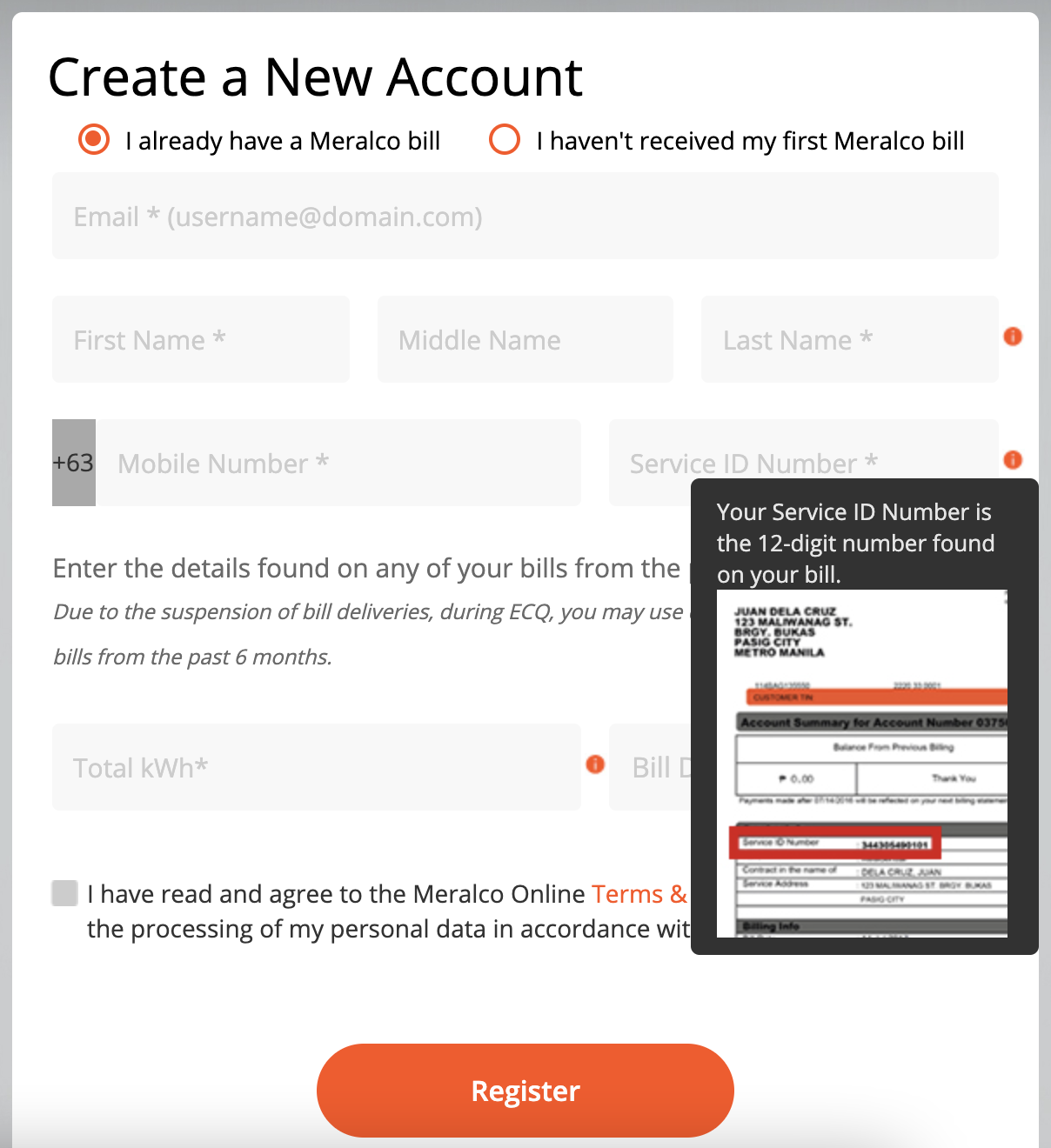
Register your service ID number
You’ll have one service ID number upon sign up, but if you’re paying for multiple households, you can only add service ID numbers on the Meralco app. Once you’ve logged them on the app, they will be reflected on the Meralco Online website.
The Customer Account Number (CAN) is different from the service ID number. The CAN is 10 digits long, while the service ID number is 12 digits long.
Paying takes less than 10 minutes
Have your card and phone ready before transacting. If you have more than one service ID number, select the ones you want to pay for. You can also pay for all your registered service ID numbers in one go.
Once you’ve indicated the service ID numbers you’re paying for and you see your total amount, you’ll fill out details such as your name, credit card number, and billing address.
You’ll then be redirected to a secure payment site which will send a unique one-time pin to your mobile device. This random string of numbers must be inputted before the transaction can push through.
Redirection to the site should take less than 30 seconds, with a note of thanks displayed on screen. Refresh your browser or the Meralco app and your due will be back to zero. You’ll also receive an e-mail confirming your payment.
The Meralco app is free for download on the App Store and the Play Store.
* * *
This story originally appeared on Reportr.world.
* Minor edits have been made by the Realliving.com.ph editors.